How to Use Your Membership
Your membership gives you a set number of novels every cycle — not the whole library, just the ones you choose. This page walks through picking them, reading them, and what happens when your cycle renews.
Quick start
1. Sign in and open your dashboard
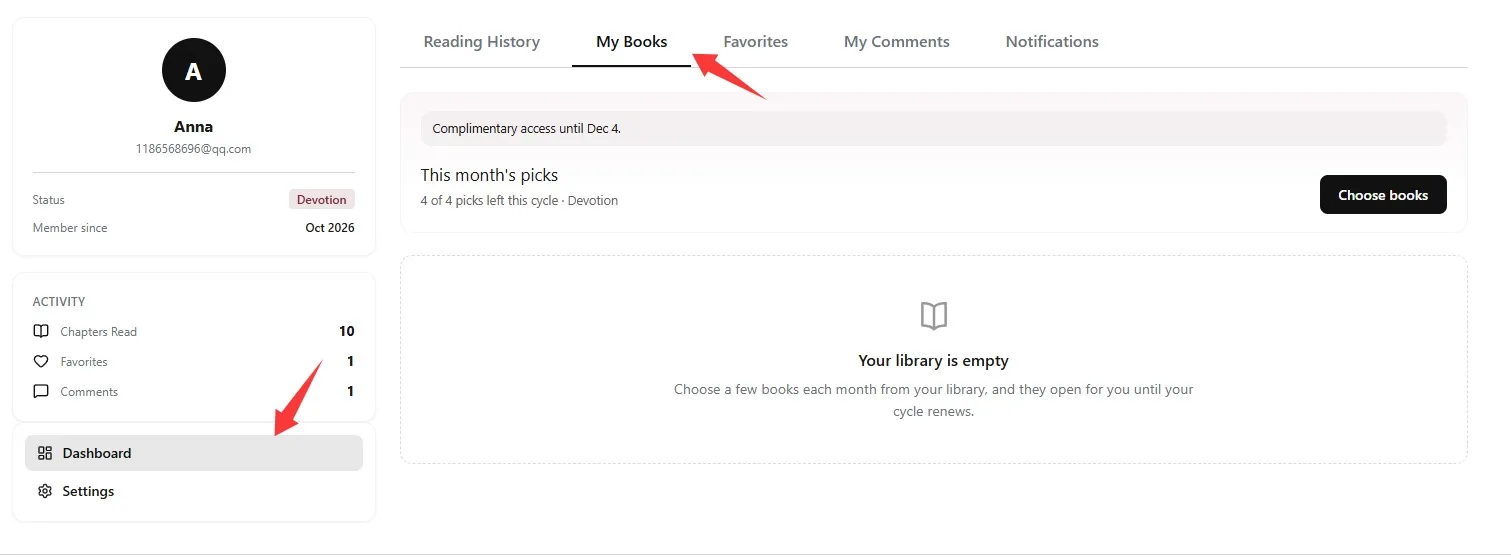
Use the same account you always use on this site. Once you’re signed in, open Dashboard and switch to the My Books tab.
2. Check your picks for this cycle
This is where everything happens. The panel tells you three things: when your membership renews, how many picks you have left, and which novels you already have.
3. Choose your novels
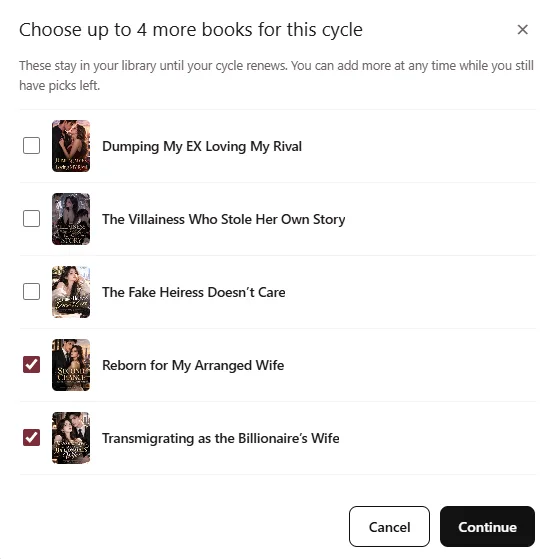
Press Choose books. A list of every novel you can pick appears. Tick the ones you want, then press Continue.
4. Confirm
After Continue you get one more screen. Press Yes, confirm. This is the step that actually unlocks the novels, so don’t close the page before it.You don’t have to make all your selections at once. If you still have slots remaining, you can make another selection at any time.
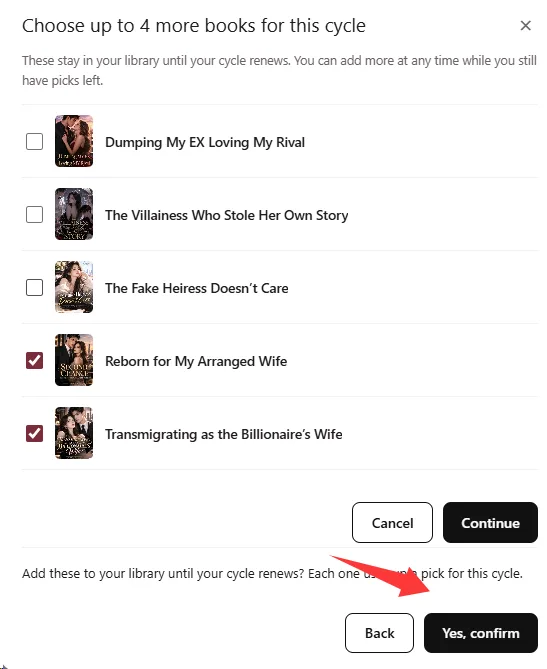
If your picks still show as unused after you confirmed, the confirmation step didn’t go through. Open My Books again and repeat steps 3–4. If it still doesn’t work, contact us — we can check it on our side.
5.Reading your picks
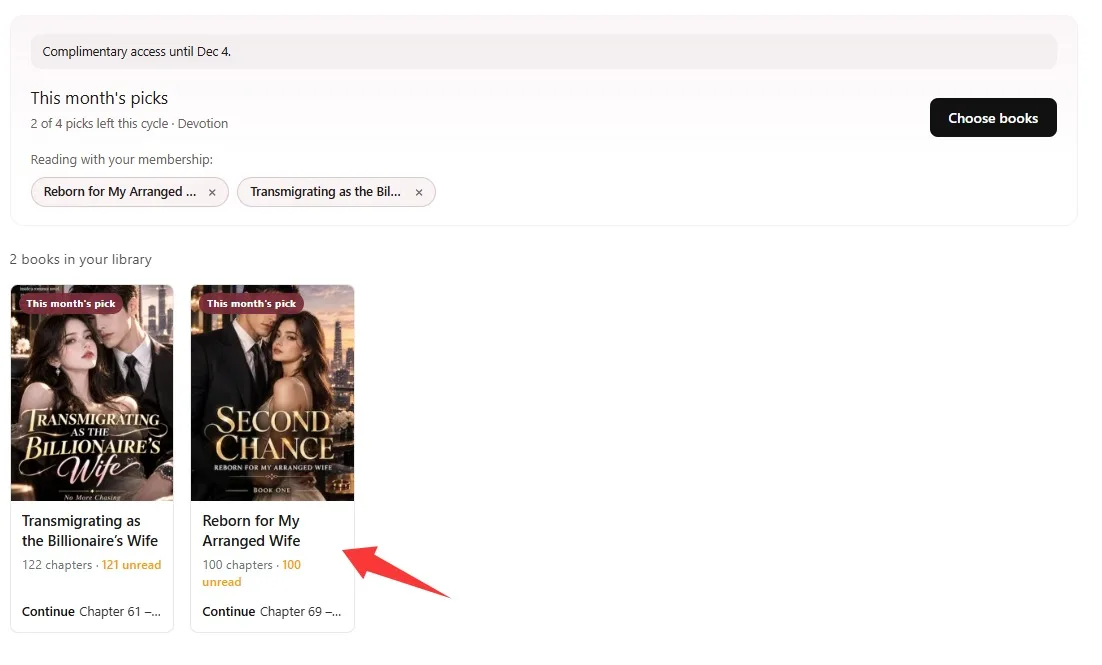
Once a novel is yours, every chapter of it opens normally. You don’t need to unlock chapters one by one.
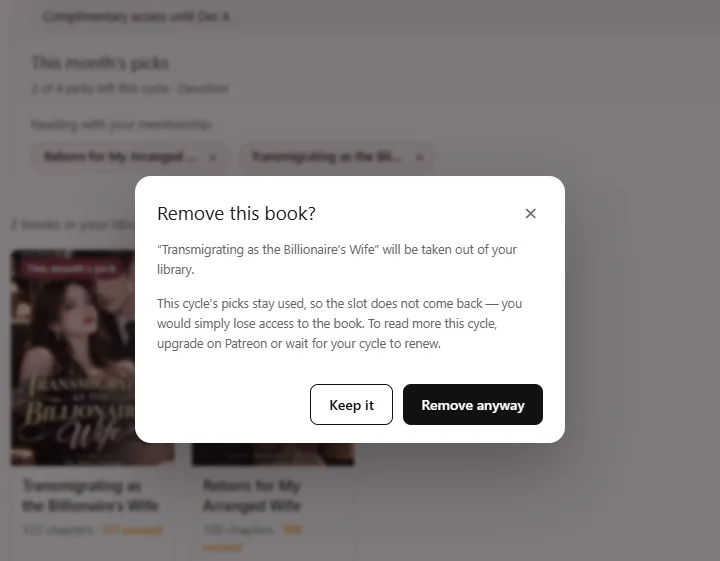
6.Removing a book from your library
You can take a novel out of My Books at any time by pressing the × next to its title. Read the warning before you do
7.When you run out of picks
The button changes to Picks used this cycle. Press it and you get two honest options: upgrade on Patreon for more picks, or wait for your cycle to renew.
Your picks do not roll over. Whatever you leave unused disappears when the cycle renews and is replaced by a fresh set.
8.Your cycle, renewing and refunds
Your cycle follows your own billing date, not the 1st of the month. If you subscribed on the 5th, your new picks arrive on the 5th.
| What you do | What happens |
|---|---|
| Stay subscribed | Fresh picks on every charge date. Last cycle’s novels lock a day after the new cycle starts. |
| Cancel the renewal on Patreon | You keep this cycle’s novels until the cycle ends, then they lock. Nothing is charged again. |
| Get a refund | The membership ends immediately and the chosen novels lock right away. |
| Card fails | Patreon retries. Your novels stay readable for 1 day while you update your card, but you can’t choose new ones during that day. |
| Upgrade your tier | Takes effect immediately. New picks appear at once; novels you already chose are left untouched. |
| Downgrade your tier | Applies to the current cycle. We keep your earliest picks up to the new tier’s number and remove the rest — removed picks don’t come back this cycle. |
9.If something looks wrong
Two things cause almost every problem we see: subscribing on Patreon and then connecting a different Patreon account here, or connecting before the pledge was confirmed. Both are fixable in a minute on our side.
Sign out and sign back in first — that refreshes your access. If your picks still don’t appear, we can sync your membership by hand.
There is also another case: due to network or regional issues, our website may not have synced in time. If you find that your features are not working as described above, please contact us promptly, and we will resolve it for you within 12 hours.
When you contact us, please include:
- the username you use on this site
- the email on your Patreon account
- roughly when you subscribed